Now on the iOS App Store • Synced with Google Calendar, Outlook, Notion & Asana

Your AI Meeting MemoryReimagined.

Transform your meetings and videos into actionable insights on Web and iOS. Secure, fast, and collaborative AI transcription everywhere you work.
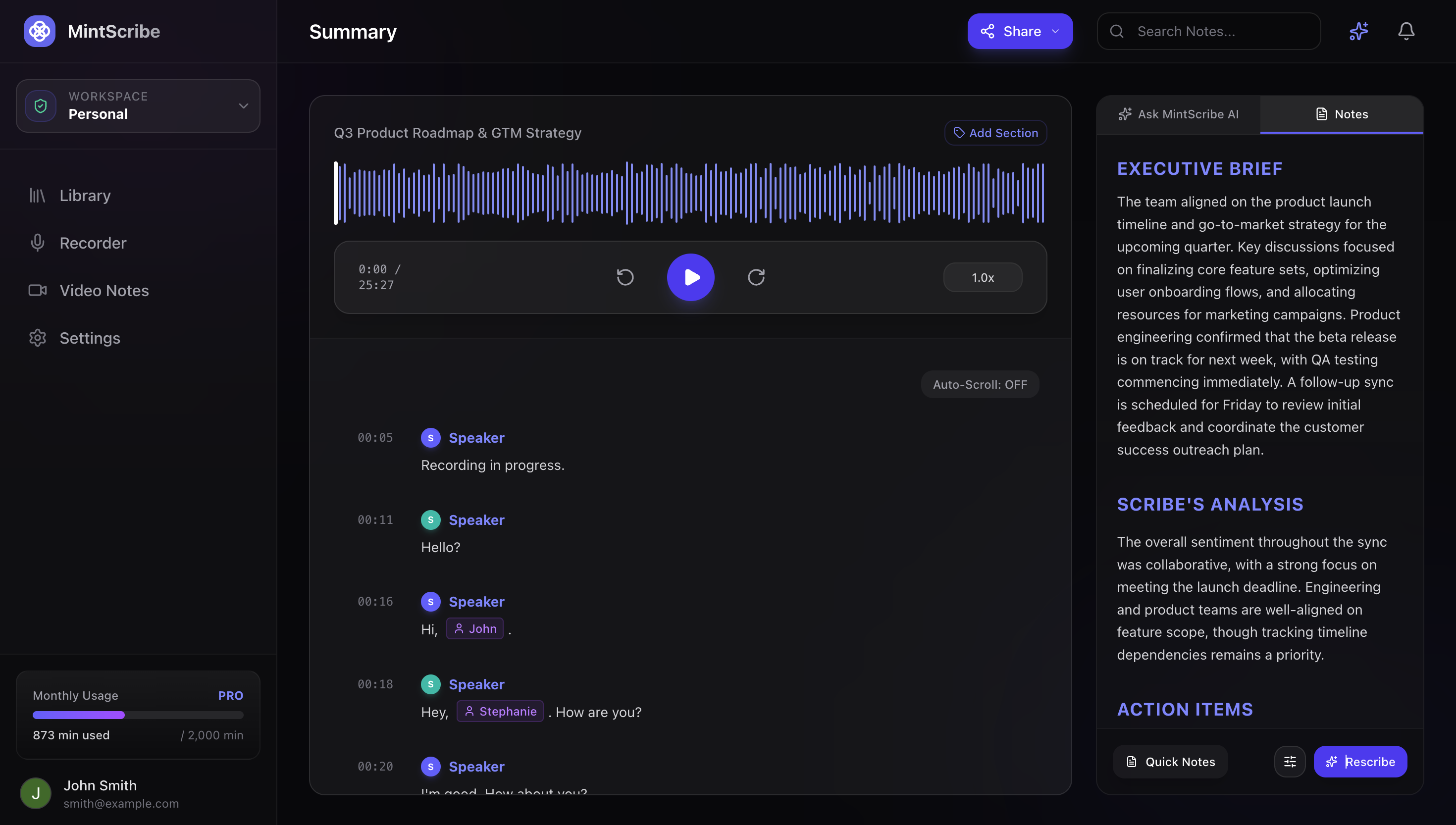
MintScribe Dashboard Preview

Everything you need to stay present.

Focus on the conversation. Scribe AI handles the capture, summarization, and action item mapping across your stack.

AI Summary

Instantly digest meetings with the upgraded Deepgram Nova-3 engine. Capture exact nuances, technical agreements, and action items, backed by a failover queue (AssemblyAI/Replicate) for 99.9% uptime.

Generated Scribe Summary
## EXECUTIVE BRIEF
The team agreed to transition task management to Notion, enabling Scribe AI to push action items directly to the database.

Quick Notes

Rapidly capture thoughts mid-meeting without breaking eye contact. Jot it down, Scribe AI renders it as clean Markdown alongside your transcripts.

Summary Templates

Customize summary outputs. Toggle between presets like Technical Focus, Action-Items, or Quick Catch-up, or apply custom prompts to narrow Scribe AI's focus.

Presets
Technical Focus
Action-Item Focus
Quick Catch-up

Workflow Integrations

Streamline tasks across your stack. Auto-sync meetings with Google & Outlook Calendars, stream action items directly to Notion or Asana, or interact with YouTube videos with synced timestamp playback.

Connected Hub
Sync Active

Streaming Insights

See real-time sentiment, questions, and topics as they occur. Scribe AI analyzes meeting energy and intent live during audio streaming.

Voice Signatures

Advanced speaker profiling for your team. Record a short voice print snippet, and Scribe AI will automatically map and identify speakers by their voice signature, ensuring perfect attribution in transcripts.

Now on App Store

Native iOS App for iPhone

Capture in-person meetings, hallway conversations, and lectures on the go. Built natively for iOS with Dynamic Island & Lock Screen Live Activities, uninterrupted background recording, real-time transcription, and instant cloud sync with your MintScribe web workspace.

Deep dive into Insights.

It's more than just a transcript. It's a second brain for your conversations.

Ask AI

Chat directly with your transcript. Ask 'what did we agree on?' or 'summarize the key blockers' and get instant, referenced answers.

Scribe AI Context

Your AI remembers your priorities. By feeding Scribe AI your context, it automatically highlights what matters most to your specific projects across all meetings.

Video Notes

Extract insights seamlessly from videos. Drop a YouTube link or upload a local file, and get full transcripts, summaries, and action items in seconds.

Simple, transparent pricing.

Choose the plan that fits your recording and analysis needs.

Free

For individuals looking to supercharge their notes.

$0
  • 120 minutes / month
  • Core AI Summary & Quick Notes
  • Streaming Insights
  • 15 Ask AI Chats / day
  • Limited Transcript History
Start for free
Most Popular

Pro

For professionals who need deep insights.

$9.99 / MONTH
  • 3,000 minutes / month
  • Everything in Free
  • Unlimited Ask AI
  • AI Voice Print Matching
  • Custom Summary Templates
  • Google & Outlook Calendar Auto-Sync
  • Notion & Asana Integrations
  • Video Notes & YouTube Import
Get Pro

Team

For highly collaborative organizations.

$21.99 / USER / MONTH
  • 10,000 minutes / seat / month
  • Everything in Pro
  • Collaborative Workspace & Roles
  • Failover Redundancy & Priorities
  • Priority Support
  • Create shareable links for sessions
Get Team
Questions

Frequently Asked Questions

Everything you need to know about Scribe AI, integrations, and data security.

MintScribe is your meeting intelligence assistant on Web and iOS. It transcribes your audio conversations in real-time, identifies key themes, and creates structured summaries, deliverables, and action items. It can process live voice recordings on your iPhone or browser as well as pre-recorded audio and video files.
Yes! MintScribe is available worldwide on the Apple App Store for iPhone. The native iOS app features one-tap background recording, Lock Screen and Dynamic Island Live Activities, real-time transcription with Deepgram Nova-3, instant AI summaries, Ask AI across your library, and seamless real-time cloud synchronization with your MintScribe web workspace.
MintScribe uses advanced, dynamic voice print signature matching. Instead of forcing you to record manual voice samples in your settings, our engine learns automatically in the background when you rename a speaker in a transcript. Once a profile is mapped, MintScribe identifies that voice in future sessions to automatically map speakers by name.
Yes. MintScribe integrates with both Google Calendar and Outlook Calendar. Once authorized, it automatically syncs with your upcoming meetings, matches attendees to your workspace profiles, and pre-configures titles and participants so you can focus entirely on the conversation.
MintScribe makes it easy to push deliverables directly to your project trackers. Once you connect your Notion or Asana credentials in your Settings, MintScribe can dynamically search for your shared databases (like a 'Tasks' database in Notion) or projects. You can ask MintScribe in chat to 'Add a task to Notion' or click action buttons to push items instantly, complete with detail blocks, deadlines, and context links.
Summary Templates allow you to control how MintScribe structures your meeting notes. You can toggle between presets like Action-Item Focus (for tracking tasks), Technical Focus (highlighting database schemas, codebase debt, and API configurations), and Quick Catch-up (short, high-level overview). You can also add a Custom Focus Prompt to tell the AI to target specific details, such as 'focus heavily on client design feedback' or 'highlight timeline dependencies'.
Yes. Through MintScribe's Video Notes feature, you can drop any YouTube link or upload local MP4/WebM video files directly. MintScribe transcribes the video, structures it chronologically, and integrates it with your Ask AI chat assistant just like a regular voice meeting, complete with interactive timestamp synchronization.
MintScribe is built for enterprise-grade reliability. If our primary transcription engine (Deepgram Nova-3) experiences service issues, MintScribe automatically redirects processing to our backup failover systems (powered by AssemblyAI and Replicate) in the background. A decoupled Next.js queue ensures your transcripts are processed and delivered without interruption.
We employ multiple security protocols to protect your confidentiality. Integration tokens (Notion/Asana) are encrypted using industry-standard AES-256-GCM before database storage. Additionally, MintScribe automatically runs PII scrubbing filters on your transcripts to redact sensitive personal data like emails, phone numbers, and credit cards before processing.
No. Under our Zero-Training Guarantee, we never use your raw audio, video files, transcripts, or summaries to train our internal algorithms or third-party AI models. All data sent to our transcription and processing engines is governed by developer terms that strictly exclude training.
We support a wide range of standard media formats including MP3, WAV, M4A, WebM, and MP4. The upload limit is 100MB per file, which comfortably accommodates meeting recordings up to 3 hours long.
Yes, both features are available on our Free tier. Free accounts receive live Streaming Insights (real-time topic and sentiment trends) and up to 15 Ask AI chat queries per day. Upgrading to Pro unlocks unlimited Ask AI chat, full task integration pipelines, custom templates, and video file processing.